GitHub Foundations
Introduction to Git
What is version control?
A version control system (VCS) is a program or set of programs that tracks changes to a collection of files. With the goal to easily recall earlier versions of individual files or of the entire project.
Another name for a VCS is software configuration management (SCM). VCS is one of the practices involved in SCM.
Instances of VCS used a centralized server to store a project history. This centralization meant that the one server was also potentially a single point of failure.
Git is distributed, which means that a project's complete history is stored both on the client and on the server.
Git terminology
- Working tree: The set of nested directories and files that contain the project that's being worked on.
- Hash: Git uses hashes that are 160 bits long, to identify if a file has changed or not. If the file timestamp is changed, but the file hash isn't changed, Git knowns the file contents aren't changed.
- Object: A Git repo contains four types of objects:
- A blob object that contains an ordinary file.
- A tree object represents a directory.
- A commit object represents a specific version of the working tree.
- A tag is a name attached to a commit.
- Branch: Is a named series of linked commits. The most recent commit of a branch is called the head.
Git and GitHub
As mentioned previously, Git is a distributed version control system (DVCS). GitHub is a cloud platform that uses Git as its core technology, that acts as the remote repository.
Basic Git commands
git statusgit addgit commitgit loggit help
Introduction to GitHub
What is GitHub?
GitHub is a cloud-based platform that uses Git, a distributed version control (DVCS) system, as its core.
Four pillars of GitHub
- AI: The GitHub Enterprise platform is enhancing collaboration through AI-powered pull requests and issues through Copilot, and security by automating security checks faster.
- Collaboration: Repos, Issues, Pull Requests, and other tools to help the whole company to work faster, cut down approval times, and ship more quickly.
- Productivity: CI/CD tools directly integrated into the workflow, the platform gives users the ability to set tasks and forget them. Giving time to developers to focus on what matters most.
- Security: GitHub Enterprise platform includes native, first-party security features that minimize security risk with a built-in security solutions. Security Overview and Dependabot are those features.
What is a repository?
A repository contains all of your project's files and each file's revision history.
- To create a repository, click on the plus button at the top right:
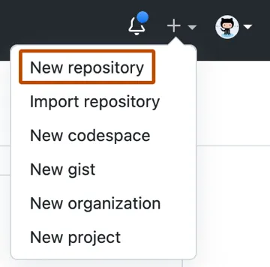
- To add a file to your repo, click on the Add file button

What are gists?
Similarly to repositories, gists are a simplified way to share code snippets with others. Basically, gist is a Git repository, which you can fork and clone to be made either public or secret.
What are wikis?
Every repository on GitHub comes equipped with a section for hosting documentation, called a wiki. While a README file quickly tells what your project can do, you can use a wiki to provide additional documentation.
Components of the GitHub flow
What are branches?
Branches are an essential part to the GitHub experience because they're where we can make changes without affecting the entire project we're working on. Your branch is a safe place to experiment with new features or fixes.
What are commits?
A commit is a change to one or more files on a branch. Every time a commit is created, it's assigned a unique ID and tracked along with the time and contributor.
Within a git repository, a file can exist in several valid states as it goes through the version control process. The primary states for a file in a Git repository are Untracked and Tracked. These two states consist if Git is aware or not of the file existence.
Tracked files are actively monitored by Git. And have the following substates:
- Unmodified: The file is tracked, but it hasn't been modified since the last commit.
- Modified: The file(s) has been changed since the last commit, is not staged yet.
- Staged: The modified file(s) are ready to be committed into the staged area (aka. index)
- Committed: The file is in the repository's database. It represents the last committed version of the file.
What are pull requests?
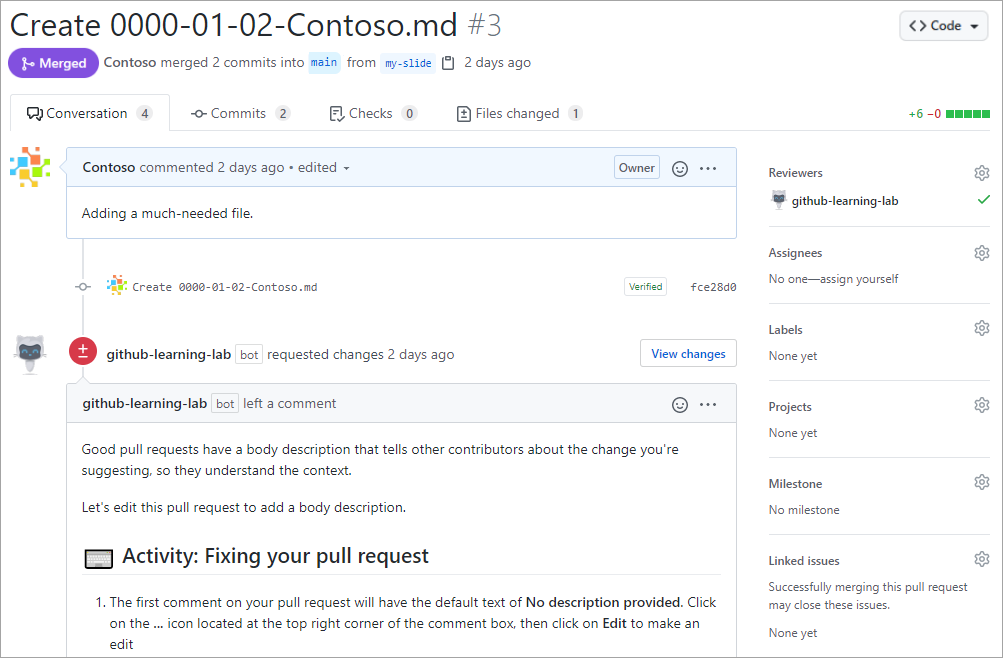
A pull request is the mechanism used to signed that the commits from one branch are ready to be merged into another branch.
A team member who submits a pull request can request the review of other team members before the merge.
Once the changes have been approved (if required), the pull request's source branch is merged into the base branch.
The GitHub flow
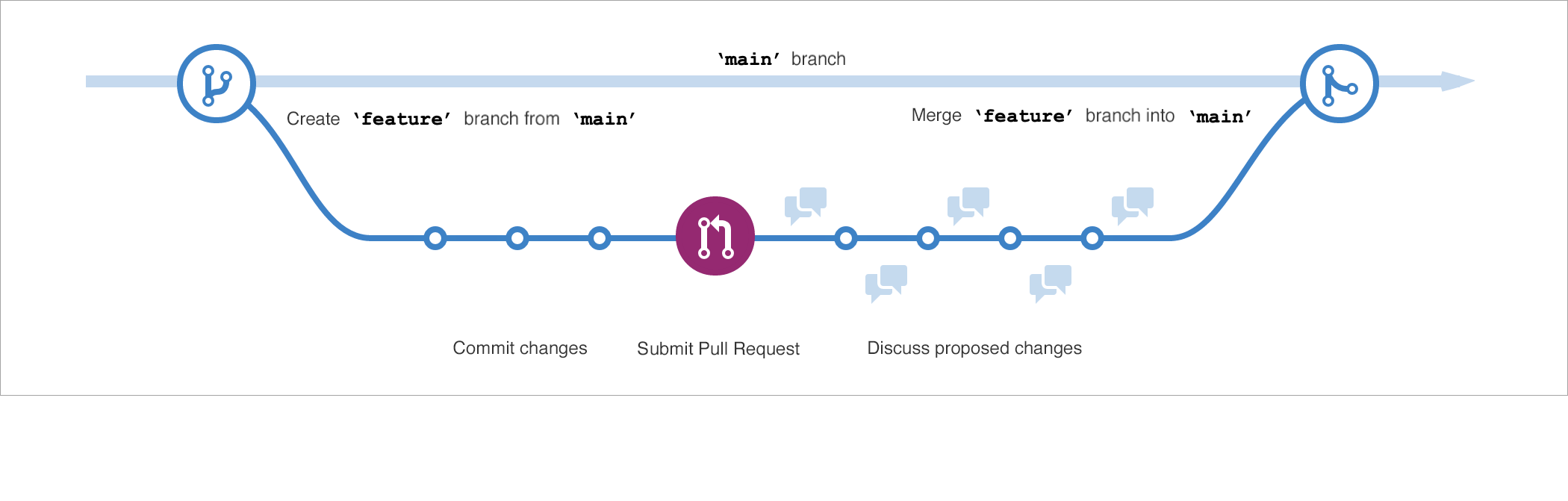
The GitHub flow can be defined as a lightweight workflow that allows for safe experimentation. You can test new ideas and collaborate with your team by using branching, pull requests, and merging.
- Start by creating a branch so that the changes, features and fixes you create don't affect the main branch.
- Next, make your changes on the branch you have created for experimentation.
- Now, create a pull request to ask collaborators for feedback. On this step, reviews are important prior to the merge with the main branch.
- If the code is reviewed and approved, the merge can occur to sync the code changes on the main branch.
- Finally, you can delete your branch. To prevent that others use accidentally old branches.
GitHub is a collaborative platform
Along of the features that allow to keep the project up-to-date as branches, and pull requests. GitHub has more features to improve collaboration within repositories.
Issues
GitHub Issues were created to track ideas, feedbacks, tasks, or bugs for work on GitHub. An issue can be created from a repository:

Issues can be attached to a project, a pull request, and to a label as well.
Discussions
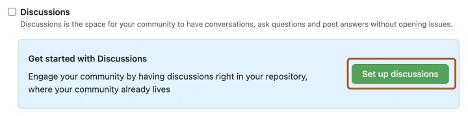
Discussions are for conversations accessible to everyone and aren't related to code.
[!NOTE] Discussion is enabled on repository settings
GitHub platform management
Managing notifications and subscriptions
You can choose to receive ongoing updates about specific activity on GitHub through a subscription. Notifications are the updates that you receive for specific activity to which you're subscribed.
Subscription options
You can choose to subscribe to notifications for:
- A conversation in a specific issue, pull request, or gist.
- CI activity, such as the status of workflows in repositories set up with GitHub Actions.
- Repository issues, pull requests, releases, security alerts, or discussions (if enabled).
- All activities in repository.
What are GitHub Pages?
GitHub Pages is a static site-hosting service that takes HTML, CSS, and Javascript files straight from a repository on GitHub. Optionally, you can run the files through a build process and publish a website. Edit and push your changes, and your project is live for the public in a visually organized way.
Introduction to GitHub's products
GitHub accounts and plans
There are three types of GitHub accounts:
- Personal
- Organization
- Enterprise
Personal accounts
Every person who uses GitHub.com signs into a personal account. Your personal/user account can own resources such as repositories, packages, and projects and has a straightforward way to manage your permission. Actions that you take, are attributed to your personal account.
Each personal account uses either GitHub Free or Pro. All personal accounts own an unlimited number of public and private repositories. If you use GitHub Free, private repositories owned by your personal account have a limited feature set.
Organization accounts
Organization accounts are shared accounts where an unlimited number of people can collaborate across many projects at once. Unlike personal accounts, permissions with organization accounts are done with a tiered approach.
Orgs can also own resources such as repositories, packages, and projects. However, you can't sign into an organization. Instead, each person signs into their own personal account, and any actions on the organization resources are attributed to their personal accounts. Each personal account can be a member of multiple organizations.
Enterprise accounts
Enterprise accounts on GitHub.com allow admins to centrally manage policies and billing for multiple organizations and enable inner sourcing between their organizations.
Organizations are shared accounts for enterprise members to collaborate across many projects at once. Owners can invite existing organizations to join your enterprise account.
GitHub plans
There are several free GitHub products, in addition to the paid ones:
- GitHub Free for personal accounts and organizations
- GitHub Pro for personal accounts
- GitHub Team
- GitHub Enterprise
GitHub Free for personal accounts
Signing up for GitHub Free gives a new user a personal user account. A personal user account includes unlimited public and private repositories and unlimited collaborators.
With GitHub Free, a personal account includes:
- GitHub Community Support
- Dependabot alerts
- Two-factor authentication enforcement
- 500-MB GitHub Packages storage
- 120 GitHub Codespaces core hours per month
- 15-GB GitHub Codespaces storage per month
- GitHub Actions:
- 2,000 minutes per month
- Deployment protection rules for public repositories
GitHub Free for organizations
With GitHub Free for organizations, you can work with unlimited collaborators on unlimited public repositories, with a full feature set. Or, unlimited private repository with a limited feature set.
In addition, teams can work and manage groups.
GitHub Pro
GitHub Pro is similar to GitHub Free with upgraded features:
- GitHub Support via email
- 3,000 GitHub Actions minutes per month
- 2-GB GitHub Packages storage
- 180 GitHub Codespaces core hours per month
- 20-GB GitHub Codespaces storage per month
- Advanced tools and insights in private repositories:
- Required pull request reviewers
- Multiple pull request reviewers
- Protected branches
- Code owners
- Autolinked references
- GitHub Pages
- Wikis
- Repository insight graphs for pulse, contributors, traffic, commits, code frequency, network, and forks
GitHub Team
GitHub Team is the version of GitHub Pro for organizations. GitHub Team is better than GitHub Free for organizations because it provides increased GitHub Actions minutes and extra GitHub Packages storage.
- GitHub Support via email
- 3,000 GitHub Actions minutes per month
- 2-GB GitHub Packages storage
- Advanced tools and insights in private repositories:
- Required pull request reviewers
- Multiple pull request reviewers
- Draft pull requests
- Team pull request reviewers
- Protected branches
- Code owners
- Scheduled reminders
- GitHub Pages
- Wikis
- Repository insight graphs for pulse, contributors, traffic, commits, code - frequency, network, and forks
- The option to enable or disable GitHub Codespaces
GitHub Enterprise
GitHub Enterprise accounts enjoy a greater level of support and extra security, compliance, and deployment controls.
You can create one or more enterprise accounts. And you are assigned the role of enterprise owner. In that role, you can add and remove organizations to and from the enterprise account.
In addition to the features available with GitHub Team, GitHub Enterprise includes:
- GitHub Enterprise Support
- More security, compliance, and deployment controls
- Authentication with security assertion markup language (SAML) single sign-on
- Access provisioning with SAML or System for Cross-domain Identity Management (SCIM)
- Deployment protection rules with GitHub Actions for private or internal - repositories GitHub Connect
- The option to purchase GitHub Advanced Security
There are two different GitHub Enterprise options:
- GitHub Enterprise Server
- GitHub Enterprise Cloud
The significant difference is that GitHub Enterprise Server (GHES) is a self-hosted solution that allows organizations to have a full control over their infrastructure.
GitHub Enterprise Cloud includes a dramatic increase in both GitHub Actions minutes and GitHub Packages storage, including extra features:
- 50,000 GitHub Actions minutes per month
- 50-GB GitHub Packages storage
- A service level agreement for 99.9% monthly uptime
- Option to centrally manage policy and billing for multiple GitHub.com - organizations with an enterprise account
- Option to provision and manage the user accounts for your developers, by using Enterprise Managed Users
GitHub Mobile and GitHub Desktop
GitHub Mobile and GitHub Desktop are options to access your GitHub account aside from github.com.
GitHub Mobile
Allows you to access securely your GitHub account from mobile devide to perform several activities as:
- Read, and review Pull Requests
- Receive notifications based on mentions
- Secure your Github.com account with two-factor authentication
GitHub Desktop
GitHub Desktop is an open-source, stand-alone software application that simplify the usage of Git in GitHub through an user interface. Users can:
- Add and clone repositories
- Check out branches with pull requests and view CI statuses
- Compare changed images
GitHub billing
GitHub bills separately for your personal account, and for each organization or enterprise account you own. Each bill is a combination of charges for your subscriptions and usage-based billing.
- Subscriptions include your account's plan, such as GitHub Pro or GitHub Team, and paid products as GitHub Copilot and apps from GitHub Marketplace.
- Usage-based billing applies when the cost of a paid product depends on how much you use the product. For example, the cost of GitHub Actions depends on how many minutes your jobs spend running and how much storage your artifacts use.
Configure code scanning on GitHub
What is code scanning?
Code scanning uses CodeQL to analyze the code in a GitHub repository to find security vulnerabilities and coding errors. You can use code scanning to find, triage, and prioritize fixes for existing problems in your code.
About code scanning with CodeQL
- Use default setup to quickly configure CodeQL analysis for code scanning on your repository. The default setup handles choosing the languages to analyze, query suite to run, and events that trigger scans with the option to manually configure the languages and query suites.
- Use advanced setup to add the CodeQL workflow directly to your repository, using your workflow file with the github/codeql-action.
- Run the CodeQL CLI directly in an external CI system and upload the results to GitHub.
Enable code scanning with third party tools
Instead of running code scanning in GitHub, you can perform analysis elsewhere and then upload the results. You can upload Static Analysis Results Interchange Format (SARIF) files generated outside GitHub.
About SARIF file uploads for code scanning
Github creates code/scanning alerts in a repository using information from SARIF files. You can generate SARIF files using many static analysis-security testing tools, including CodeQL.
Introduction to GitHub Copilot
GitHub Copilot, your AI pair programmer
Powered by OpenAI Codex, GitHub Copilot acts as a pair programmer that can help you to create and manipulate code quickly, to focus on topics that really matter. GitHub Copilot offer three features:
Copilot chat
Like ChatGPT, Copilot chat can be used to make questions and queries considering the context that you are working with. Using GitHub Copilot in your favorite IDE, the Copilot chat feature is capable based on the file, and project that you are working, to provide accurate feedbacks and answers.
Copilot for pull requests
OpenAI GPT-4 model adds support in GitHub Copilot for AI-powered tags in pull-request description through a GitHub app installed by admins or repository owners. GitHub Copilot can automatically fills out pull request description based on the changed code, send on the pull request.
Copilot for the CLI
Developers spend most of their time on the terminal using several CLI's, GitHub Copilot also support queries directly on the terminal to reduce the amount of times developers switch to another programs and sites.
Subscription plans
GitHub Copilot Business
GitHub Copilot Business allows you to control who can use GitHub Copilot in your business. The access can be granted for individuals and teams.
GitHub Copilot Enterprise
GitHub Copilot Enterprise is available for organizations through GitHub Enterprise Cloud. And the main different between GitHub Copilot Business is the plus layer of personalization for organizations. GitHub Copilot Enterprise can index an organization's codebase for a deeper understanding and for suggestions that are more tailored. If offers access to GitHub Copilot customization to fine-tune private models for code completion.
Interact with Copilot
Inline suggestions
Inline suggestions are the most immediate form of assistance in Copilot. As you type, Copilot analyzes your code and context to offer real-time code completions. This feature predicts what you might want to write next and displays suggestions.
- To accept suggestions please
TABand to reject pressESC
Command palette
The command palette provides quick access to various functions in Copilot, so you can perform complex tasks with only a few keystrokes.
- Open the command palette in Visual Studio Code by selecting
Ctrl+Shift+PorCmd+Shift+Pon Mac. - Enter Copilot to see available commands
- Select actions like Explain This or Generate Unit Tests to get assistance
Copilot chat again
Copilot chat is an interactive feature that enables you to communicate with Copilot by using natural language. You can ask questions or request code snippets, and Copilot provides responses based on your input.
For example: "How do I implement a binary search in Python?"
Copilot is ideal for exploring new coding concepts or getting help with unfamiliar syntax.
Inline chat
Inline chat enables context-specific conversations with Copilot directly within your code editor.
- Place the cursor where you want assistance
- Use the keyboard shortcut
Ctrl+IorCmd+Ito open inline chat.\ - Ask questions or request changes specific to that code location
Comments to code
Copilot uses natural language processing to convert comments into code.
Here is an example:
# Generate a hello world with Typescript
    // Code written by GitHub Copilot based on the comments
Multiple suggestions
For complex code snippets, Copilot can offer multiple alternatives.
- When Copilot offers a suggestion, look for the light bulb icon.
- Select the icon or use
Alt+]orOption+]to cycle through alternatives
Explanations
Understanding existing code is crucial, especially in large projects. You can use the Explain This feature to get explanations for code snippets.
- Select a block of code
- Right-click the code block, and then select Copilot: Explain This on the shortcut menu
- Read the explanation that Copilot provides for the selected code
Code with GitHub Codespaces
GitHub Codespaces is configurable, allowing you to create a customized development environment for your project.
Create a Codespace
Codespaces can be created on GitHub.com, in Visual Studio Code, or by GitHub CLI. And there are four ways to create a Codespace:
- From a GitHub template or any template repository on GitHub.com to start a new project
- From a branch in your repository, for new feature work
- From an open pull request, to explore work-in-progress
- From a commit in a repository's history to investigate a bug at a specific point in time
Codespace creation process
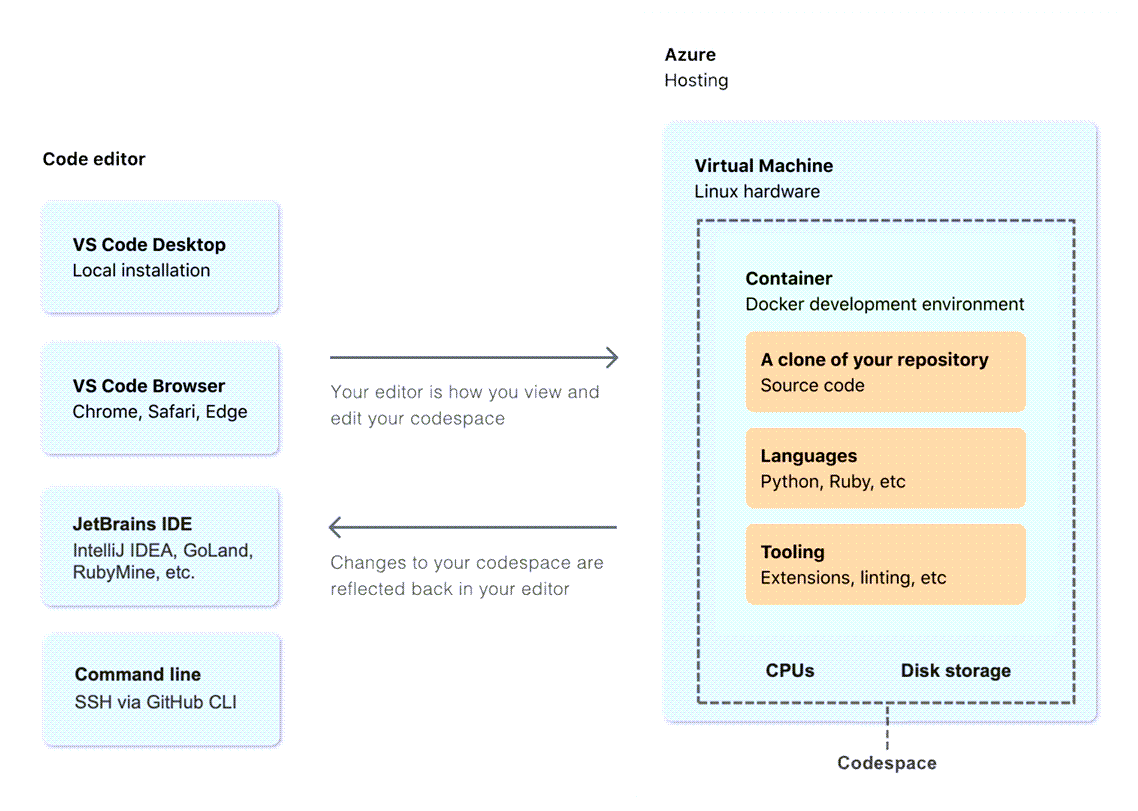
When you create a GitHub Codespace, four processes occur:
- A virtual machine and storage are assigned to your Codespace
- A container is created
- A connection to the Codespace is mage
- A post-creation setup is made
Personalize your Codespace
Codespaces support several personalizations in line with your environment requirements. Follow some of the customizations:
- Settings sync: You can synchronize your VS Code settings between your desktop application with VS Code web client
- Dotfiles: You can a dotfiles repository to specify scripts, shell preferences, and other configurations
- Change your shell: You can define your preferred shell
- Set a region: A region can be defined to host your code space
- Timeout configuration: Configure a timeout to stop your Codespace - Default 30 minutes
- Configure automatic deletion: Inactive Codespaces are automatically deleted. You can configure how long your Codespace is retained, up to a maximum of 30 days
Codespaces versus GitHub.dev editor
You can use GitHub.dev to navigate files and source code repositories from GitHub, and commit code changes. If you want to do more heavy lifting like testing your code, use GitHub Codespaces. It has compute associate with it so you can build and run your code, and have terminal access.
You can start your workflow in GitHub.dev editor and continue working on Codespaces to build your code or debug it.
Manage your work with GitHub Projects
GitHub Projects is a space inside GitHub, where the work can be organized, planned, and executed.
There are several enhancements on the new Project experience. Which enables more customization.
Creating an organization-level project
It is possible to create a project for your organization, following this steps:
- In the top right corner of GitHub.com, select your profile photo, then select Your organizations.
- Scroll down to select the organization for your new Project.
- Navigate from the Overview tab to the Projects tab.
- Select the green button labeled New Project.
- A pop-up prompts you to select either a template or start from scratch. Let's choose the Start from scratch option and select Table.
- Select the green Create project button.
Add an existing issue and pull request to your project
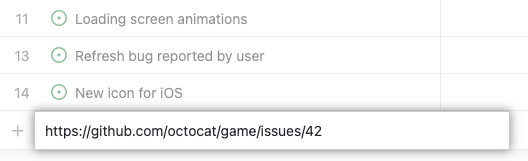
Simply copy the issue/pull request URL on the text input field to create new issue.
Contribute to an open-source project on GitHub
You can find a topic of interest using GitHub search and filtering by Topics on the right side.
Familiarize yourself with an open-source project
Open-source projects usually have these documents at the top level of the repository:
- LICENSE - The project must contain an open-source license
- README - Serves as a welcome page for the project
- CONTRIBUTING - Guidance on how to contribute to the project
- CODE_OF_CONDUCT - Rules for community members
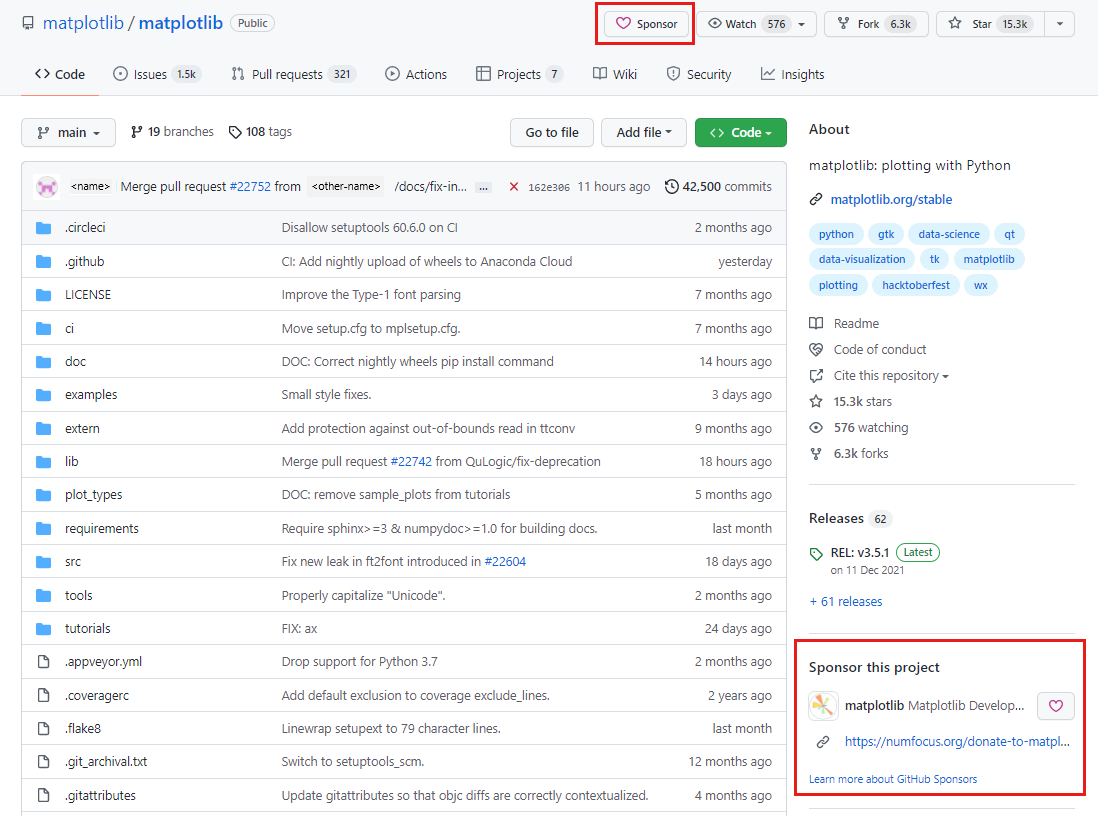
Sponsor a project
You can financially support the folks who build and maintain the open-source ecosystem through code.
Communicate your intent to maintainers
You should always start by communicating your intent to contribute before you do any actual work.
-
If you want to work on an existing issue, check that nobody is assigned to it by looking at the Assignees section, also check the Linked pull requests
Knowledge checks
- Which of the following scenarios is a common use case for a version control system?
- Making experimental changes to your project in an isolated branch.
- What is another name for a version control system?
- Software configuration management (SCM) system
- What’s the difference between Git and GitHub?
- Git lets you work with one or more local branches and push changes to a remote repository. GitHub acts as the remote repository, which is accessed through a website or command-line tools.
- What Git command gives information about how to use Git?
git help
- What is the best way to report a bug to a GitHub project?
- Search for the bug in the project's existing issues, and create a new one if it hasn't been reported yet.
- Suppose you created a bug fix on a new branch and want it to become part of the next production build generated from the
mainbranch. What should you do next?- Create a pull request to merge your new branch into the
mainbranch.
- Create a pull request to merge your new branch into the
- Suppose you'd like to work with a project on GitHub, but you don't have write access to the project. What can you do to contribute?
- Fork the project's repository to your GitHub account, clone the forked repository to your local machine, push changes to your repository, and submit a pull request to the target (upstream) repository.
- What's the difference between GitHub organization accounts and GitHub personal/user accounts?
- Organizational accounts are shared accounts, while personal/user accounts are for individuals.
- What's the best reason to decide to upgrade to the GitHub Enterprise product?
- Because you want to centrally manage users and repositories across multiple organizations.
- What's the purpose of a team?
- A team is intended to reflect a company or group's structure. It's used to provide cascading access permissions and make it easy to notify all team members via mentions.
- What's a function you can execute on GitHub Mobile?
- Manage, triage, and clear notifications from github.com
- When code scanning is enabled, what is one default event that triggers a scan?
- Pushing a change
- Which of the following are the tools used to upload a SARIF file?
- The tools used are GitHub Actions, the code scanning API, and the CodeQL CLI
- What is the difference between scheduled versus triggered events in code scanning?
- Scheduled events run based on a specified schedule and triggered events run on code events such a push
- What is GitHub Copilot?
- GitHub Copilot is an AI pair programmer that you can use to get code suggestions
- What are the supported IDE extensions for GitHub Copilot?
- VS Code, Visual Studio, Neovim, and JetBrains
- What is the difference between GitHub Copilot Business and GitHub Copilot Enterprise?
- GitHub Copilot Enterprise has an extra layer of personalization. Organizations use their own codebase to train GitHub Copilot.
- Which directory is the clone placed in after creating a Codespace?
- ´/workspaces´
- What's the maximum number of Codespaces that you can create per repository or branch?
- You can create an unlimited number of Codespaces per repository or branch, depending upon available space. When you reach an upper amount of resources, a message displays that an existing Codespace needs to removed/deleted before a new Codespace can be created.
- What happens when Codespace loses internet connectivity?
- If the connection to the internet is lost while working in a Codespace, you aren't able to access your Codespace.
- What defines the beginning of a Codespace's lifecycle?
- A Codespace's lifecycle begins when you create a Codespace and ends when you delete it.
- What Project descriptor automatically saves when you change it?
- Project name
- What does an iteration field help you do in Projects?
- Allows you to create sequential phases of your project and group issues and pull requests based on the phase.
- What field can you use in order to make a Priority grouping like High, Medium, and Low in your Project?
- Single select
- What is the easiest way to add automation to your Project?
- Built-in Automation
- What is the name of the section where you can change the visibility of your Project, close your Project, or delete your Project?
- Danger zone
- Which of the following Markdown snippets produces the text Hello, world! in bold italics?
- Hello, world!
- How do you print certain characters, like asterisks (*) and underscores (_), literally on your output?
- Escape them with a backslash, like * or _
- Suppose there's an HTML snippet that you want to include on your GitHub Pages web site, but Markdown doesn't offer a way to render it. What should you do?
- Just add the HTML inline
- What is the best place on a GitHub repository to find where you can help a project?
- The README file
- What is the preferred way to ask for help or reviews on a pull request?
- Add comment in the pull request
- What is needed before you can create a pull request on GitHub?
- Fork a repo, clone it, commit changes, and push to your fork
Commands tested on the sandbox
- Initiate a git configuration setting the branch as main
git init -b main
- Create a new branch and check it out
git checkout -b newBranchName
- Creating a CodeQL database for the first scan
codeql database create .codeql --language=javascript-typescript
- Running analyze
codeql database analyze .codeql --format=sarif-latest --output=./codeql-analyze.sarif
- Upload SARIF results
codeql github upload-results --repository=yuribreion1/second-brain --ref=refs/heads/main --sarif=codeql-analyze.sarif
GitHub Foundations Practice Test
- How can you define guiding protocols for users intending to submit bug reports or propose new features in your repository so they know what information to fill-in?
- Create issue templates
- What are the different repository visibility options?
- Private, Public and Internal (Enterprise only)
- What are the use cases for labels?
- Categorizing issues and pull requests
- What is the GitHub Flow?
- It refers to a branch-based workflow where developers create a branch for each new change they are working on, and then open pull requests to get their code reviewed, tested, and merged into the main branch
- What is the meaning of the word
distributedin distributed version control system?- It means that developers can have a full copy of the repository and its history on their local machine
- Your project requires appropriate hardware to run. Can you customize the amount of CPU cores that will be allocated to your GitHub Codespace environment?
- Yes, you can choose an alternative machine type either when you create a codespace or at any time after you have created a codespace
- Which of these statements best describes what GitHub is?
- GitHub is a platform that uses Git as its core technology and adds features that make collaboration and code management easier
- What is the purpose of a
CODEOWNERSfile?- The
CODEOWNERSfile allows you to define individuals or teams that are responsible for specific areas of the codebase or its entirety
- The
- What is a repository in GitHub?
- It is a place where you can store your code, your files, and each files revision hisotry
- What is the difference between GitHub projects and GitHub projects classic?
- GitHub Projects is a the new GitHub experience which offers a lot of new features and improvements over the older GitHub Projects classic
- Can you disable the issues tab on a repository?
- Yes
- What are the different forms of 2FA or MFA supported by GitHub?
- Security key, Text message, Time-based one-time password (TOTP), Passkey, GitHub mobile
- What is the role of an organization moderator?
- Moderators are organization members who, in addition to their permission as members, are allowed to block and unblock non-member contributors, set interaction limits, and hide comments in public repositories owned by the organization
- What are Enterprise Managed Users?
- It is a GitHub Enterprise feature that allows you to manage user access from an external identity provider such as Azure AD or Okta
- Which of the following actions cannot be performed directly from GitHub Desktop?
- Managing GitHub Actions
- What are pinned repositories on GitHub?
- Pinned repositories are repositories that you have pinned to the top of your GitHub profile
- Which of the following actions can you perform on a GitHub Discussion? (Choose three.)
- Pin a discussion, Convert it to an issue, Transfer it to another repository discussion
- What is the main difference between an organization member and an outside collaborator for a repository owned by that organization?
- Outside collaborators have repository-level access but are not part of the organization; members belong to the organization and may have broader access and roles
- If you face yourself often writing the same set of comments on issues or pull requests, what GitHub feature would you use to save time?
- Saved replies
- What are the differences between GitHub Copilot Individual and GitHub Copilot Business?
- GitHub Copilot Individual can only be used by personal accounts and GitHub Copilot Business is used by organizations and enteprises
- What is the relation between Git and GitHub?
- Git is a distributed version control system and GitHub is a platform that uses Git as its core technology
- What are the different possible lifecycle phases for a GitHub Codespaces?
- Create, Delete
- What features is unique to GitHub Desktop compared to github.com?
- Visualize branch histories in a graphical interface
- What syntax is used in GitHub Markdown to create a task list?
- [ ] and - [x]
- What is the effect of adding a line
Closes #11to the pull request description?- Once that pull request is merged, the issue #11 will be closed automatically
- Which feature in GitHub Projects enables you to effortlessly generate graphs and charts for visualizing the current status and historical progression of your project?
- Project Insights
- Which of these statements accurately describes a difference between personal accounts and organization accounts on GitHub?
- An organization account can have multiple owners and members, whereas a personal account belongs to a single user only
- Which of these actions will make sure that prior to any push to the
mainbranch, the changes have been approved by at least two people? (Choose three.)- Create a branch protection rule for
mainbranch, On the branch protection rule, require at least 2 approvals before merging a pull request, Enforce status checks are passing before merging a pull request to themainbranch
- Create a branch protection rule for
- Which Markdown element is not correctly paired with its syntax?
- Inline code -
'''code'''
- Inline code -
- Why would a repository owner want to use milestones? (Choose two.)
- To associate issues and pull requests with specific project phases, To have an overview of how much work is left to complete a project phase
- Which of these can you customize in a Codespaces
.devcontainer/devcontainer.jsonconfiguration file? (Choose three.)- Operating system or base image, Shell configuration, Codespace display name
- How can you start using GitHub Copilot after activating the GitHub Copilot subscription?
- Setup GitHub Copilot in one of the supported IDEs such as Visual Studio Code or JetBrains and start coding
- Who are repository collaborators?
- Collaborators are people who have been granted write access to a repository
- Who can setup billig or assign billing managers for an organization? (Select three)
- Owner at the organization level, Owner at the enterprise level, Billing managers at the organization level
- What is the GitHub Marketplace?
- GitHub Marketplace is a place where developers can find tools that help build software right alongside their code
- Which of the GitHub features best serves as a simple way to share small code snippets with others?
- Gists
- What is the role of an organization security manager?
- Security managers are organizational members who can view security alerts and manage settings for code security across your organization, as well as read permission to all repositories in the organization
- What is a fork in GitHub?
- A fork is a personal copy of another user repository that lives on your account
- What is InnerSource?
- InnerSource refers to the practice of applying open source principles within an organization
- What can you find in the security tab of a repository?
- A security overview of that repository such as vulnerabilities in dependencies, code scanning results, and secret scanning alerts
- How can you enforce status checks passing before merging a pull request to the
mainbranch?- By creating a branch protecting rule
- What is the GitHub Sponsors program?
- It is a way to financially support the developers of the open source projects
- What is a git commit?
- A commit is a snapshot of a repository at a specific point in time
- How can you work together with a friend of yours on a repository that you have created on your personal GitHub account?
- Go to the repository settings and invite him as a collaborator
- Which of these workflows are built-in automations in GitHub Projects? (Choose two.)
- When issues or pull requests in your project are closed, their status is set to Done
- When pull requests in your project are merged, their status is set to Done
- Which of these statements about GitHub Pages is correct?
- GitHub Pages enables you to host static sites from a GitHub repository
- Which of these tools serves as an AI pair programmer that offers autocomplete-style suggestions as you code?
- GitHub Copilot
- Is there a free version of GitHub for organizations?
- Yes
- What is a GitHub Codespace?
- It's a preconfigured development environment specifically setup for a repository. It allows you immediately start writing code for a project without having to setup a local development environment
- What are the different available options for adding issues and pull requests to a GitHub Project board?
- Individually, automatically, or in bulk
- Which of the following roles are available for a repository at the organization level on GitHub? (Choose five.)
- Read
- Write
- Maintain
- Admin
- Triage
- Is GitHub Copilot free to use?
- Yes, if you are a student, teacher, or maintainer of a popular open source project
- Which of these statements best describes a version control system?
- It is a system that tracks the history of changes made to a collection of files
- GitHub Action workflows are triggered by events. Which of these are valid events that GitHub Actions support? (Choose two.)
- A pull request is opened
- A commit is pushed to a branch
- Which feature provides pre-built charts or visualizations for repository activity and health?
- Insights tab
- Which of the following best describes GitHub secret scanning?
- A feature that searches repositories for known secret formats to prevent accidental exposure of sensitive data
- What are the different permission levels for a repository owned by a personal account? (Choose two.)
- Collaborator
- Repository owner
- What is GitHub Mobile?
- It is a mobile app for iOS and Android that allows you to work with GitHub from your phone
- How does GitHub help people that want to write proper issue and pull request comments but don't know Markdown syntax?
- There is a text formatting toolbar on issue and pull request comment forms which generates Markdown for you
- Where can you disable repository features such as issues, wikis or projects on a repository that you own?
- In the repository settings
- What are the two available options when you no longer need to use a Project?
- Close and delete
- What is a GitHub Codespace deep link?
- It is a link that points to a specific GitHub.com page that allows you to create a new GitHub Codespace and select specific configuration
- What are the possible GitHub account types? (Select three.)
- Personal accounts
- Organization accounts
- Enterprise accounts
- Who should have 2 Factor Authentication enabled on GitHub?
- All GitHub users
- What is the name of GitHub's continuous integration and continuous delivery (CI/CD) platform?
- GitHub Actions
- Which of these statements about saved replies are true? (Choose two.)
- Saved replies are comments that you can reuse in issues and pull requests
- Saved replies are only available to repository owners which can setup automated replies to issues and pull requests
- What is CodeQL?
- A code analysis tool
- What are the different options that allow you to automate operations in your GitHub Project? (Choose three.)
- GitHub GraphQL API
- GitHub Actions
- Project workflows
- Which of these is a common use case for GitHub Actions?
- Running automated tests prior to merging a pull request
- What are GitHub's slash commands?
- It is a way to quickly insert complex Markdown into your pull request or issue comments and description
- What is one of the main benefits for using a Personal Access Token (PAT) instead of a standard username and password for GitHub authentication?
- PAT can be used for authentication to GitHub when using the GitHub API or the command line. Users generate a token via the GitHub settings option, and tie the token permission to a repository or organization
- Which of the following are valid states for a pull request on GitHub?
- Merged
- Closed
- Draft
- Open
- What improvement do issue forms bring over issue templates?
- Issue forms allow for users to be prompted for information when creating an issue and then have that information automatically added to the issue
- Which of these is a practice that encourages collaboration, visibility and sharing of code among different teams within an organization?
- InnerSource
- Which GitHub pricing plan offers self-hosted deployment of GitHub?
- Enterprise
- What are some actions you can do in regards to Project Templates in your organization? (Choose three.)
- Create a new template to be used as a base for new projects
- Configure recommended templates to your organization members
- With admin or write permissions, copy an existing project as a template
- You want to merge changes from branch feature-a into main and you are creating a pull request. Which branch should be the base branch and which branch should be the compare branch?
mainis the base branch andfeature-ais the compare branch
- What are the different deployment options for GitHub Enterprise? (Select two.)
- GitHub Enterprise Cloud
- GitHub Enterprise Server
- What is/are the common GitHub pricing plan(s) for both personal and organization accounts?
- Team
- Which of these is true regarding custom fields for items in GitHub Projects?
- Custom fields enable the addition of metadata beyond the built-in options, such as target dates and iteration fields
- What language is used to write comments on GitHub issues and pull requests?
- Markdown
- What are the different possible lifecycle phases for a GitHub Codespace?
- Create, Delete
- Which of these can make a repository more discoverable? (Choose three.)
- Giving the repository a descriptive name
- Setting up topics for the repository
- A well-crafted collection of markdown documents like
README.md,CONTRIBUTING.mdand others
- Who can setup billing or assign billing managers for an organization? (Select three.)
- Owner at the enterprise level
- Owner at the organization level
- Billing managers at the organization level
- What are the possible statuses for a pull request review? (Choose three.)
- Close
- Deny
- Approve
- On your personal GitHub dashboard you received a notification that user
octocathas created a new repositoryoctocat/my-repo. Why did you receive that notification?- Because you are following the user
octocat
- Because you are following the user
- What GitHub feature allows the creation of preconfigured development environments where all necessary tools and dependencies to contribute to a repository are installed?
- GitHub Codespaces
- Which roles in an organization can view and manage security alerts for private repositories?
- Organization owners and Security managers
- Under which GitHub pricing plan can you create an unlimited number of public repositories?
- All of them
- Which advanced search operator combination would you use to find public repositories with more than 100 stars that mention 'docker' in their name?
is:public name:docker stars:100
- Which GitHub Project layout would best serve as a Kanban board?
- Board layout
- Which of these files can customize your GitHub profile?
- profile is not customizable through files but through the account settings
- If a GitHub Discussion is converted into an Issue and the issue is closed or referred to using its corresponding # number, will the discussion be modified?
- Yes
- What is a GitHub Pro plan?
- GitHub Pro is a paid plan for personal accounts that offers additional features in addition to the free plan
- How can you link a pull request to an issue? (Choose two.)
- By using a keyword in the pull request description and referencing the issue number
- Manually from either the pull requests or the issue view
- How can you link a pull request to an issue? (Choose two.)
- By using a keyword in the pull request description and referencing the issue number
- Manually from either the pull request or the issue view
- Which of these statements about pinned items on your GitHub profile is true?
- You can pin up to six repositories or gists on your profile for quick access
- Which of these statements about GitHub Enterprise deployment options are true? (Select two.)
- GitHub Enterprise Server is a self-hosted platform that runs on the company's infrastructure
- GitHub Enterprise Cloud is a cloud hosted platform that runs on the company's cloud infrastructure
- Which of these layouts are available in GitHub Projects?
- Roadmap layout
- Table layout
- Board layout
- Which of these statements about the differences of issues and discussions is true?
- GitHub Discussions are for conversational that need to be transparent and accessible but do not need to be tracked on a project board and are not related to code, unlike GitHub Issues
- Which of these is NOT a role in a GitHub Organization?
- Organization architect
- In GitHub a proposal to merge a set of changes from one branch into another branch is called a:
- Pull Request
- Which of these statements regarding GitHub Codespaces lifecycle are true? (Choose three.)
- You can disconnect and reconnect to an active Codespace without affecting its running processes
- If you create another Codespace on a branch which already had a Codespace running on it, the original Codespace will be deleted
- You can stop and restart a Codespace without losing the changes that you make to your project
- What are GitHub teams?
- It is a group of GitHub users from the same organization
- What are the effects of you following a user on GitHub?
- You will get notifications on your personal dashboard about their public activity
- Which of these best describes git?
- Git is a distributed version control system
- Which of these is a capability of a Security Manager with respect to GitHub Actions in an organization?
- They can configure which actions are allowed or blocked across the organization
- What are some actions you can do in regards to Repository Templates? (Choose two.)
- Create a reposiroty template from an existing repository
- Delete all repositories that do not use a repository template provided by your organization
- If there are multiple Readme.md files in a GitHub repository, what is the priority order to show them?
- Root directory,
.docsdirectory,.githubdirectory
- Root directory,
- What are the different levels of GitHub organizational hierarchy? (Choose three.)
- Team level
- Organizational level
- Enterprise level
- What is the minimum permission a user must have to directly push commits to a repository owned by an organization?
- Push commits
- Which of these definitions best describes open source software?
- It's software with source code that anyone can inspect, modify, and enhance
- What is a pull request template?
- Pull request template is a file that defines the default pull request structure that project contributors will automatically see when they open a pull request
- Which statement best describes the difference between cloning a repository and forking a repository?
- Forking creates a copy under your GitHub account, while cloning creates a local copy on your computer without linking ownership to your account
- Which search query finds all open issues labeled test that mention 'fix' in their body text?
is:issue is:open label:test "fix"
- How can you customize the environment that is run in GitHub Codespaces?
- By creating a
.devcontainer/devcontainer.jsonconfiguration file
- By creating a
- What are the different GitHub pricing plans for organization accounts? (Select three.)
- Enterprise
- Team
- Free
- Can you change a gist from public to secret after creating it?
- No
- How does the synchronization between GitHub projects, issues and pull requests work?
- Updates to the issues and pull requests will be automatically reflected in GitHub Projects. This integration works both ways, so that when you change information about a pull request or issue in your project, the pull request or issue reflects that information
- Which of the following is true about GitHub wikis?
- Wikis in public repositories are accessible to anyone, while those in private repositories are only accessible to repository collaborators
- Which of the following Git commands allow you to create a new branch and start working on it in one line? (Select two.)
- git switch -c
<new_branch_name> - git checkout -b
<new_branch_name>
- git switch -c
- Which tool helps you keep the repository dependencies up to date?
- Dependabot
- Where can you find publicly available GitHub Actions?
- GitHub Marketplace
- If you stop your GitHub Codespace environment can you come back to the changes later if you haven't committed them?
- Yes, that's the default behavior when stopping and then starting a GitHub Codespace
- What happens when you choose to close a Project?
- The content is retained and you have the ability to reopen it later
- Which statement best describes a major difference between new GitHub Projects and GitHub Projects Classic?
- The new GitHub Projects provide a flexible spreadsheet-like interface, custom fields, and two-way issue synchronization that were not available in Projects Classic.
- Which information can be found in the Pulse section in the Insights tab of a repository? (Choose four)
- List of unresolved conversations
- Summary of repository activity
- Amount of code line additions and deletions
- Amount of forks of the repo
- Pull requests open/merged ratio
- How can you assign a person to an issue or pull request?
- By using the Assignees field in the sidebar